Connect private services
Run a web tier and a database on two private networks in one location. Only the web tier is reachable from the Internet; the database accepts its port only from the web tier.
You will use: two networks, private routing, two security groups and two instances, in Karachi.
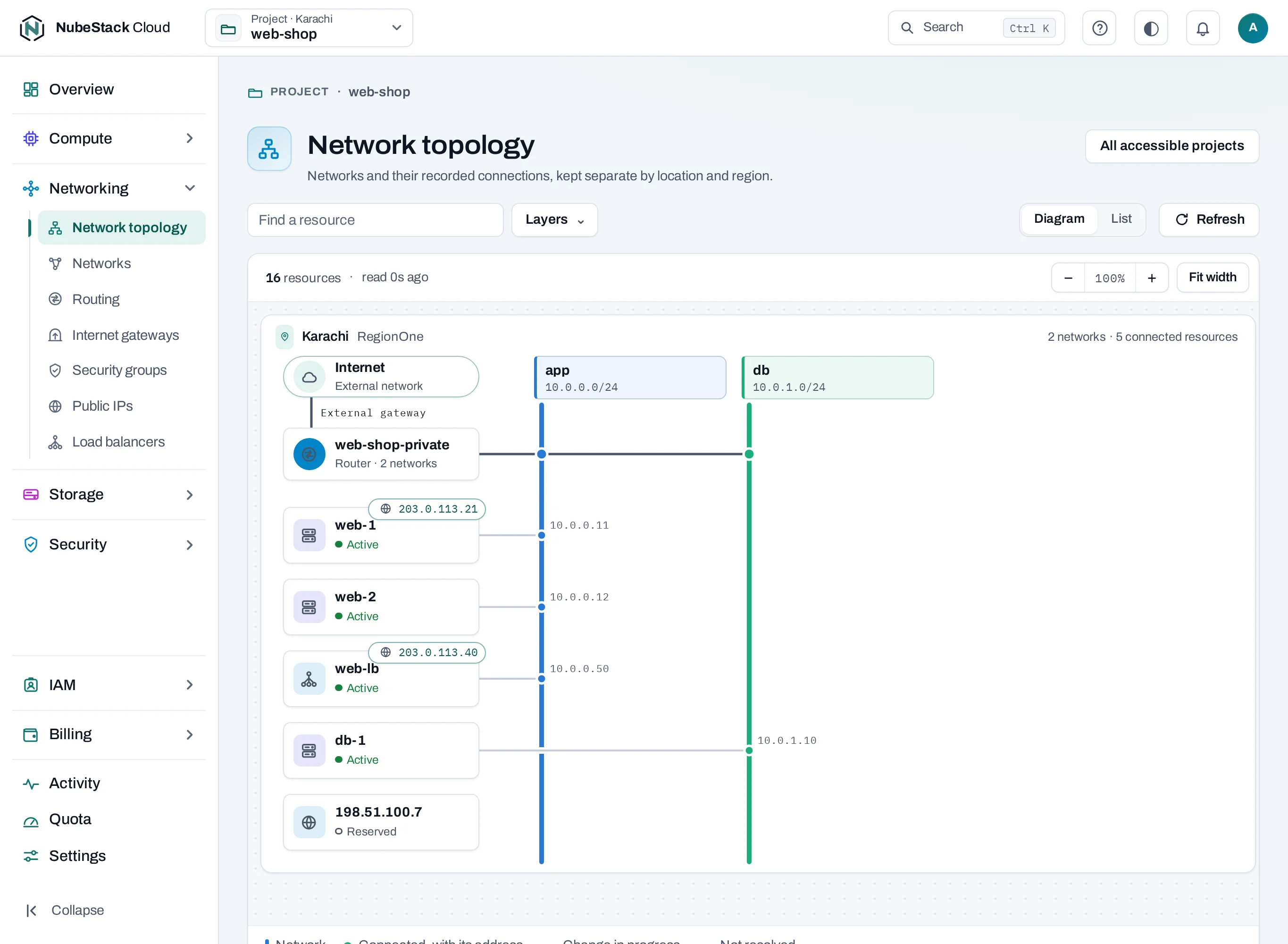
| Part | Network | Reachable from |
|---|---|---|
web-1 |
app, 10.0.0.0/24 |
The Internet on 80 and 443, through its public IP |
db-1 |
db, 10.0.1.0/24 |
Only web-1's security group, on 5432 |
Before you start
- A project in Karachi with an Internet gateway. The project's
defaultnetwork can serve asapp. - Ranges that do not overlap the project's other routed networks.
1. Create the database network
Under Networking → Networks, choose Create network: name db, range
10.0.1.0/24, Routed. Routed networks of the project reach each other through its private
router; nothing else is needed for the path.
curl -sS -X POST "$NUBESTACK_API/v1/orgs/$ORG/projects/$PROJECT/networks" \
  -H "Authorization: Bearer $NUBESTACK_API_KEY" -H "Idempotency-Key: $(uuidgen)" \
  -H "Content-Type: application/json" \
  -d '{"location": "loc_01jbkhi", "display_name": "db", "routed": true, "subnet": {"cidr": "10.0.1.0/24"}}'
2. Create the two security groups
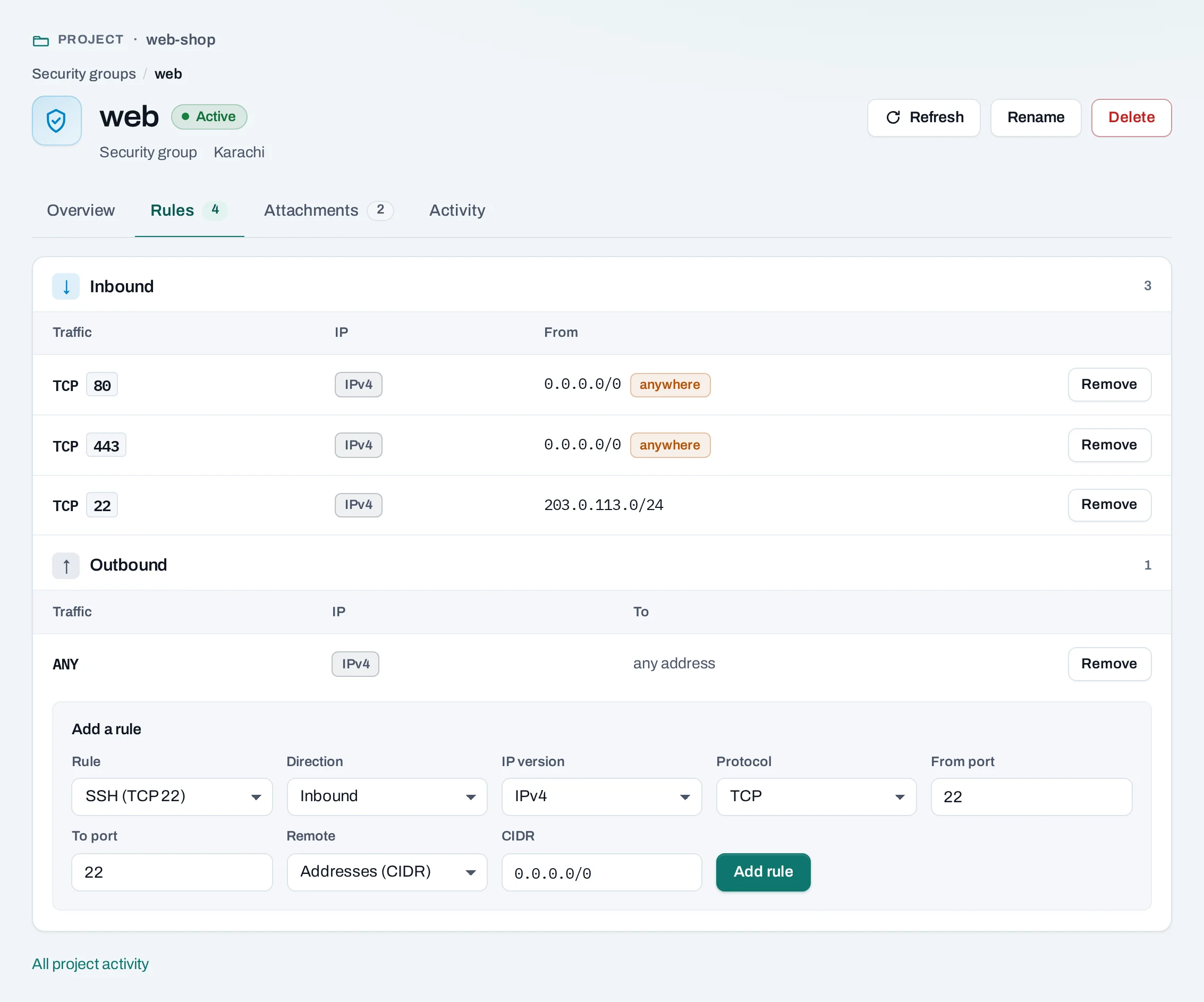
web: from the Web template (TCP 80 and 443 from anywhere). Add SSH from your office range, such as203.0.113.0/24.db: from the Empty template. Add an inbound rule: TCP5432, Remote: Security groupweb.
curl -sS -X POST "$NUBESTACK_API/v1/orgs/$ORG/projects/$PROJECT/security-groups/sgr_01jbdb:add-rule" \
  -H "Authorization: Bearer $NUBESTACK_API_KEY" -H "Idempotency-Key: $(uuidgen)" \
  -H "Content-Type: application/json" \
  -d '{"direction": "ingress", "protocol": "tcp", "port_min": 5432, "port_max": 5432, "remote_group_id": "sgr_01jbweb"}'
A rule whose remote is a group matches its instances' own addresses, so the database follows the web tier as it grows, without address lists.
3. Create the instances
web-1onapp, in thewebgroup, with A new public IP.db-1ondb, in thedbgroup, with No public IP. It can still reach the Internet for updates through the gateway; nothing on the Internet can reach it.
4. Check the path
From web-1, connect to the database's private address:
Then check what should fail does fail: from your computer, the database's address is not
reachable at all. The database itself must listen on its private address (listen_addresses in
PostgreSQL) and allow the web tier's range in its own access rules.
Open Network topology to see both networks on the router, and each instance on its network.
If it does not connect
- Both networks are Routed, and their ranges do not overlap.
db-1is in thedbgroup, andweb-1in thewebgroup.- The database listens on its private address and its port is right.
Clean up
Delete the instances, release web-1's public IP, delete the db group, then the db network.
A network cannot be deleted while instances have addresses on it.