Tags
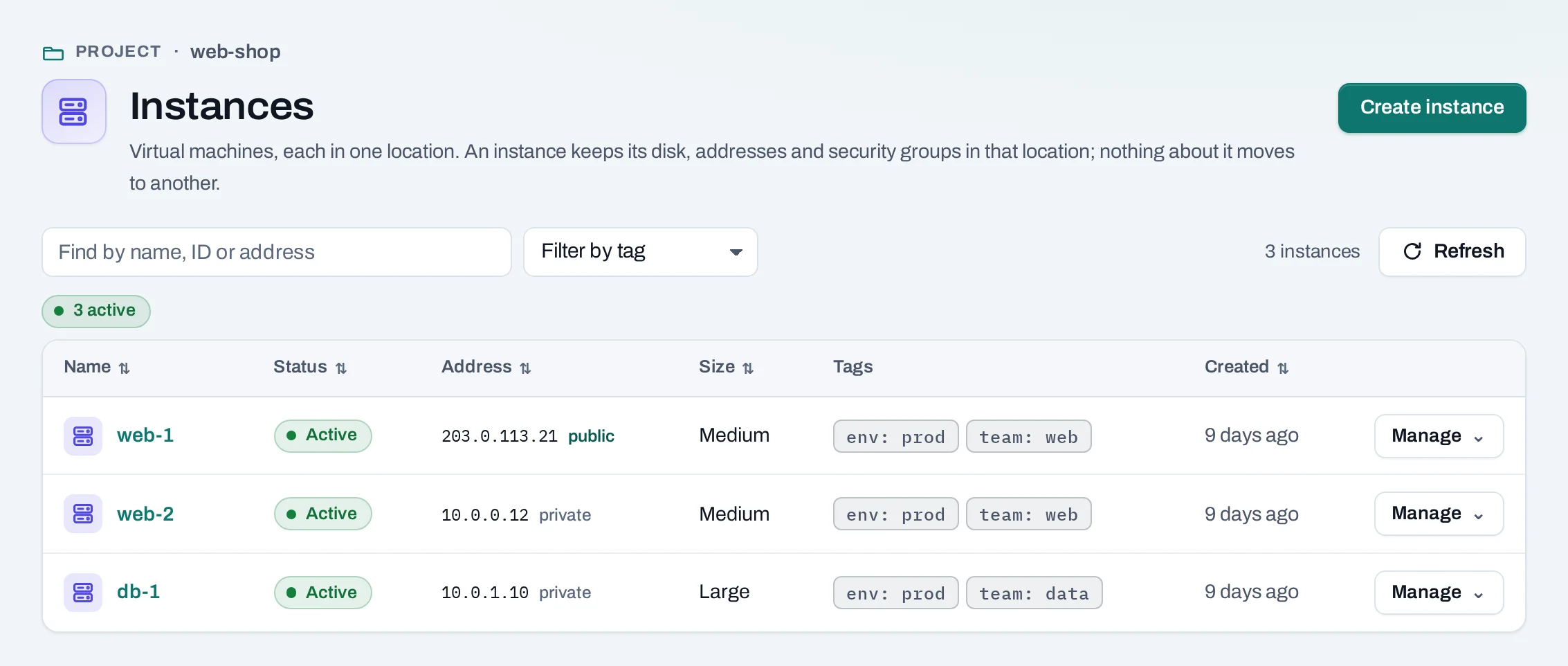
A tag is a label key: value on an instance, a volume, a network or a public IP, such as
env: prod or team: data. Lists filter by tags, and the
cost explorer adds up cost by each key.
Set tags
- When you create one: the create pages of instances, volumes and networks, and allocating a public IP, have a Tags section. Leave a row empty to skip it.
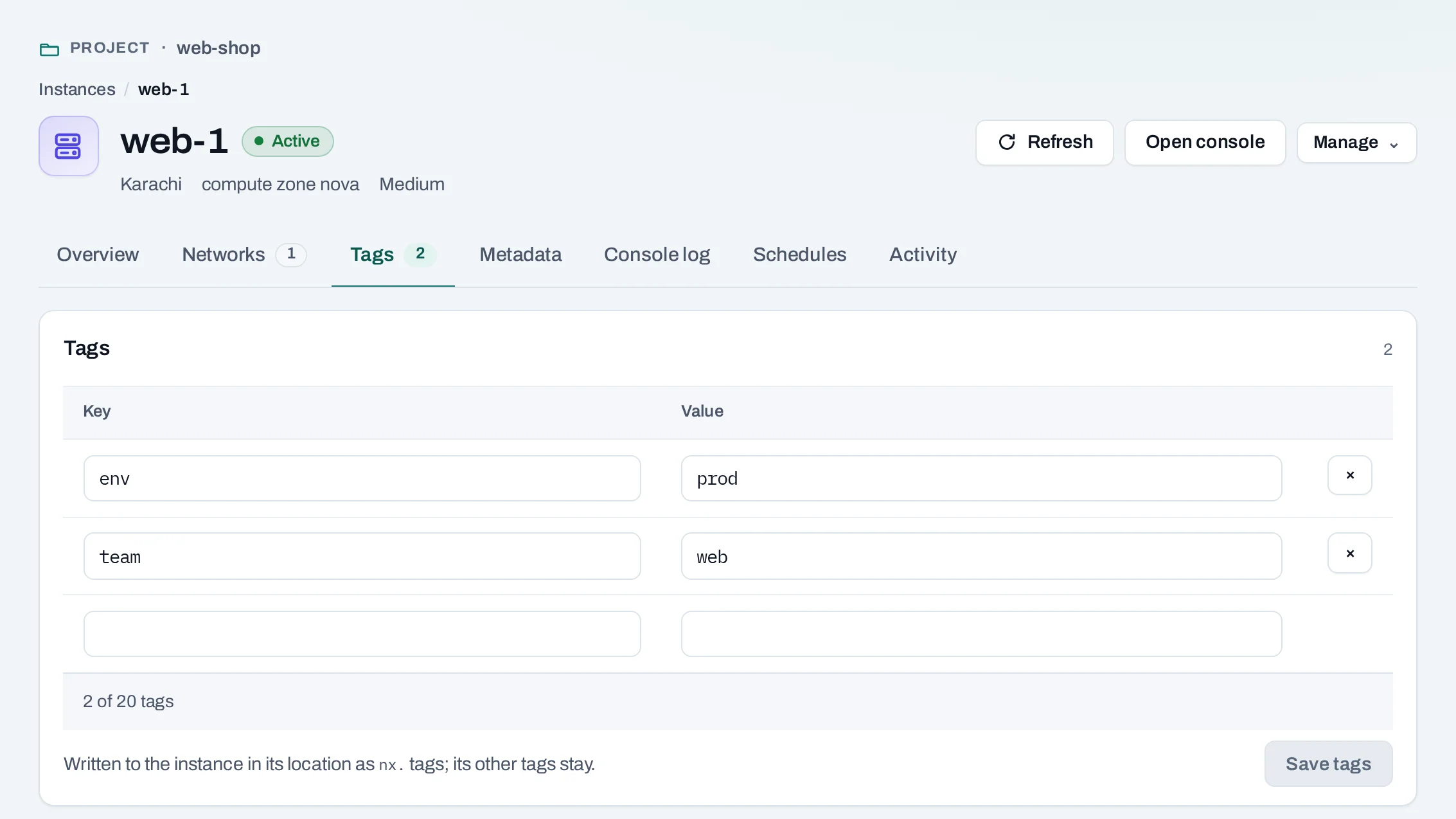
- Later: open the resource and choose its Tags tab. Change the rows and choose Save tags. The whole set is replaced: a row you remove is removed.
Set an instance's tags
curl -sS -X PUT "$NUBESTACK_API/v1/orgs/$ORG/projects/$PROJECT/servers/$RESOURCE_ID/tags" \
  -H "Authorization: Bearer $NUBESTACK_API_KEY" \
  -H "Idempotency-Key: $(uuidgen)" \
  -H "If-Match: $ETAG" \
  -H "Content-Type: application/json" \
  --data '{
  "tags": {
    "env": "prod"
  }
}'
The answer is 202 Accepted with an operation. Follow it until it succeeds.
Set a volume's tags
curl -sS -X PUT "$NUBESTACK_API/v1/orgs/$ORG/projects/$PROJECT/volumes/$RESOURCE_ID/tags" \
  -H "Authorization: Bearer $NUBESTACK_API_KEY" \
  -H "Idempotency-Key: $(uuidgen)" \
  -H "If-Match: $ETAG" \
  -H "Content-Type: application/json" \
  --data '{
  "tags": {
    "env": "prod"
  }
}'
The answer is 202 Accepted with an operation. Follow it until it succeeds.
Set a network's tags
curl -sS -X PUT "$NUBESTACK_API/v1/orgs/$ORG/projects/$PROJECT/networks/$RESOURCE_ID/tags" \
  -H "Authorization: Bearer $NUBESTACK_API_KEY" \
  -H "Idempotency-Key: $(uuidgen)" \
  -H "If-Match: $ETAG" \
  -H "Content-Type: application/json" \
  --data '{
  "tags": {
    "env": "prod"
  }
}'
The answer is 202 Accepted with an operation. Follow it until it succeeds.
Set a public IP's tags
curl -sS -X PUT "$NUBESTACK_API/v1/orgs/$ORG/projects/$PROJECT/floating-ips/$RESOURCE_ID/tags" \
  -H "Authorization: Bearer $NUBESTACK_API_KEY" \
  -H "Idempotency-Key: $(uuidgen)" \
  -H "If-Match: $ETAG" \
  -H "Content-Type: application/json" \
  --data '{
  "tags": {
    "env": "prod"
  }
}'
The answer is 202 Accepted with an operation. Follow it until it succeeds.
The rules
| Key | 1 to 32 of a-z, 0-9, _, ., -, starting with a letter |
| Value | up to 24 of A-Z, a-z, 0-9, _, ., :, -; it may be empty |
| Tags on one resource | at most 20 |
| Keys in your organization | at most 50; a new key past that is refused (tag_keys_limit) |
Filter lists
On the instances, volumes, networks and public IPs lists, choose a tag in Filter by tag. It becomes a chip; add more, and only resources with all of them stay. Remove a chip with its ×. The filter is in the page's address, so you can send the link to someone.
In the location's own tools
Your tags are written to the resource in its location, so they show in the location's dashboard
and CLI. An instance, a network or a public IP gets the tag nx.<key>=<value>; a volume gets the
metadata key nx.<key>. Tags you set there yourself, without the nx. prefix, are yours and are
kept as they are.
If someone changes an nx. tag there, the resource's page says Tags changed outside Nexus and
shows what the location has. It is not changed back. Lists, filters and cost keep using the tags
held in NubeStack Cloud; set them again on the Tags tab to write them back.
Cost by tag
In the cost explorer, choose Tag and pick a key. Each value of that key gets its share of the month's cost, and the hours of resources without the key are one Untagged row, so the rows add up to the month's total. A resource with two keys is counted once under each key, never twice under one.
A change of tags counts from the moment you save it: the hour it happened in is split, part at the old tags and part at the new.
Tags are labels only. They never decide which project owns a resource or what is deleted.