Network topology
Network topology draws a project's networks, routers, instances, load balancers and public IPs, and the lines between them. Use it to check how a service is wired, or to see what a network change would affect.
Find it at the top of Networking, or with View topology on the project's overview. In the organization scope, Networking → Network topology summarises the projects you can see and leads into each one's drawing.
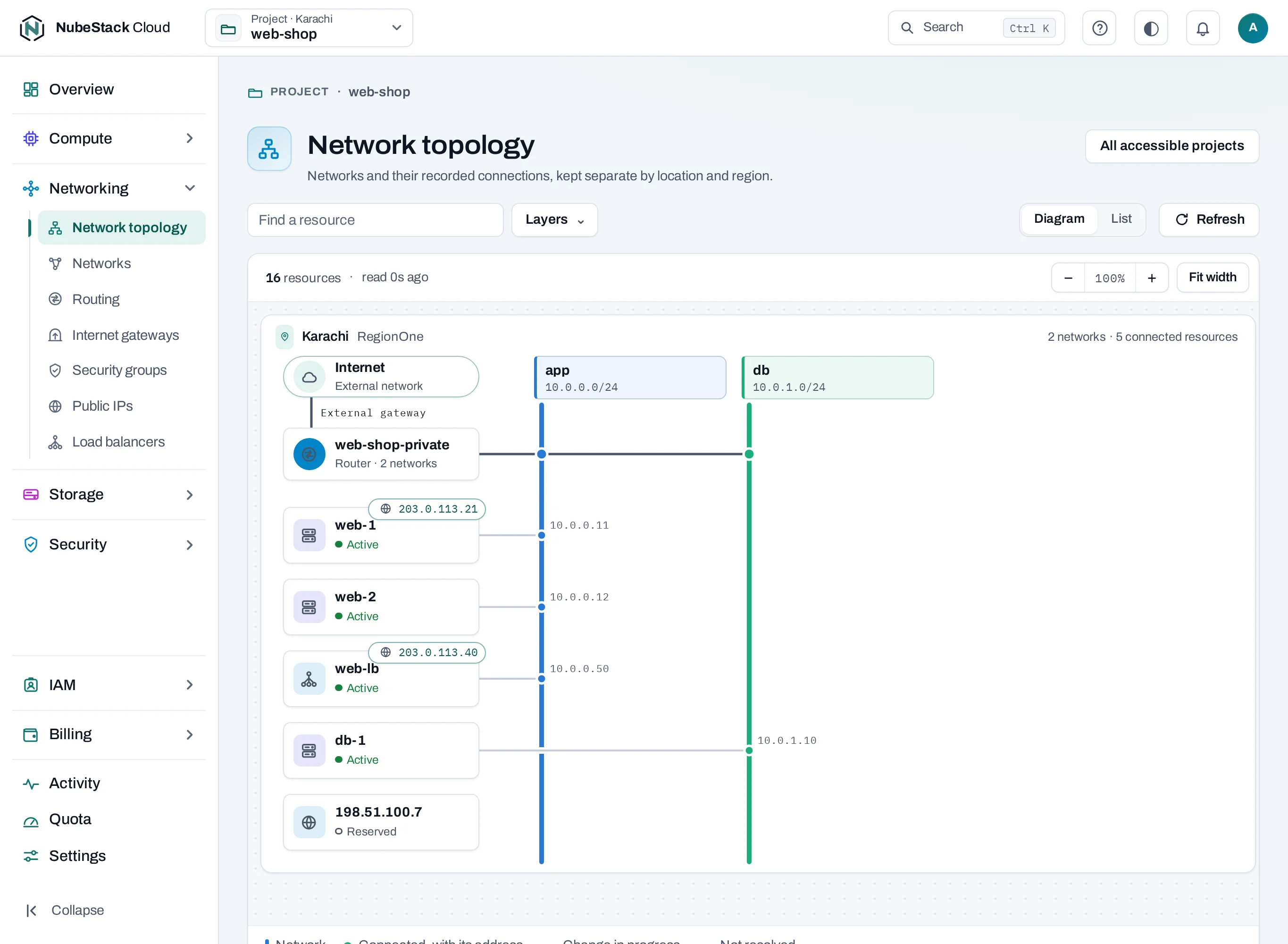
Read the drawing
- Follow an instance to its network and the router; for a service on the Internet, to its public IP and the Internet gateway.
- Choose any node to open its own page.
A line shows how things are configured. It does not test that traffic flows: security groups and the firewall inside an instance still decide that.
Missing or old data
The drawing says when the location was last read. If it has not answered, the drawing is marked stale and shows what was last known. An empty drawing can mean an empty project, a filter, or resources not read yet: choose Refresh on a list before you assume something is gone.
Limits
The drawing suits small and medium projects. Instances are not yet grouped for large projects, and nodes do not yet link to their operations. In a crowded project, use the lists and each resource's page.