Schedules
A schedule does something on its own, on a timetable you set:
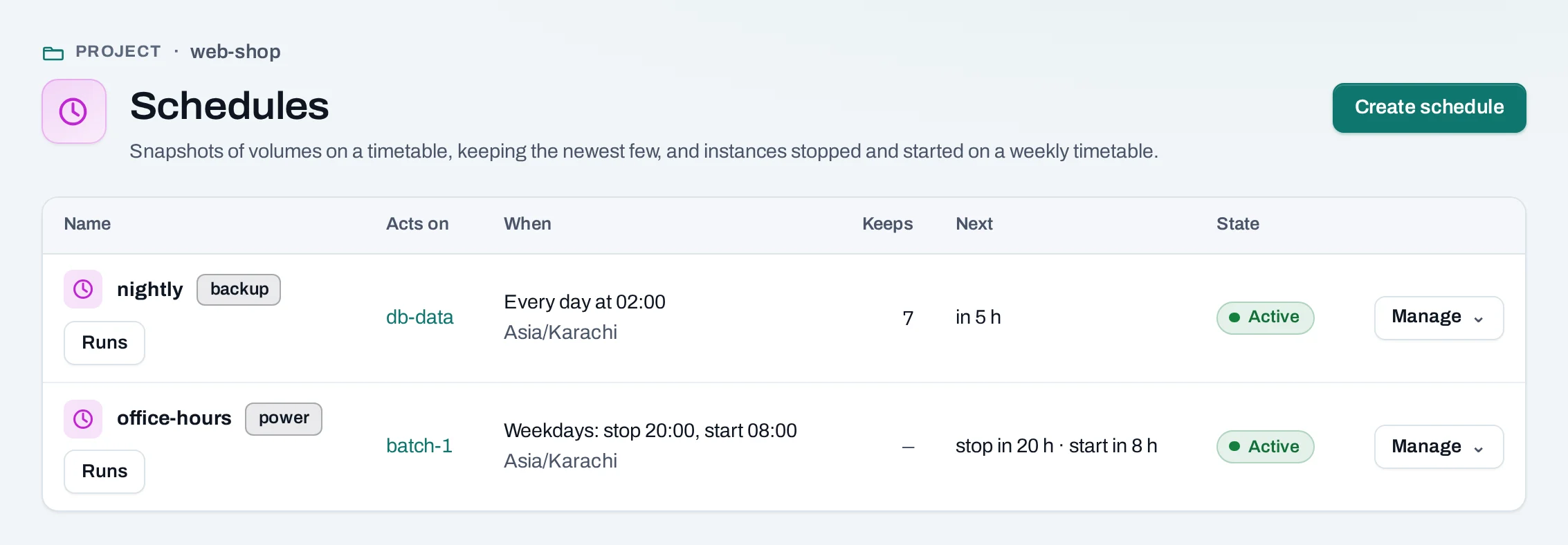
- A backup schedule snapshots volumes hourly, daily or weekly and keeps the newest few of its own snapshots of each volume.
- A power schedule stops instances and starts them again on a weekly timetable, for example stopped every weekday at 20:00 and started at 08:00.
- A size schedule sets an instance group's count at set times.
Find them under Storage → Schedules, or on a volume's or an instance's Schedules tab.
Before you start
Each run is an ordinary operation, made as the person who created the schedule or last changed or resumed it. You need the rights the runs use: snapshotting and deleting snapshots for a backup, stopping and starting instances for a power schedule. A project reader cannot make one.
Add a schedule
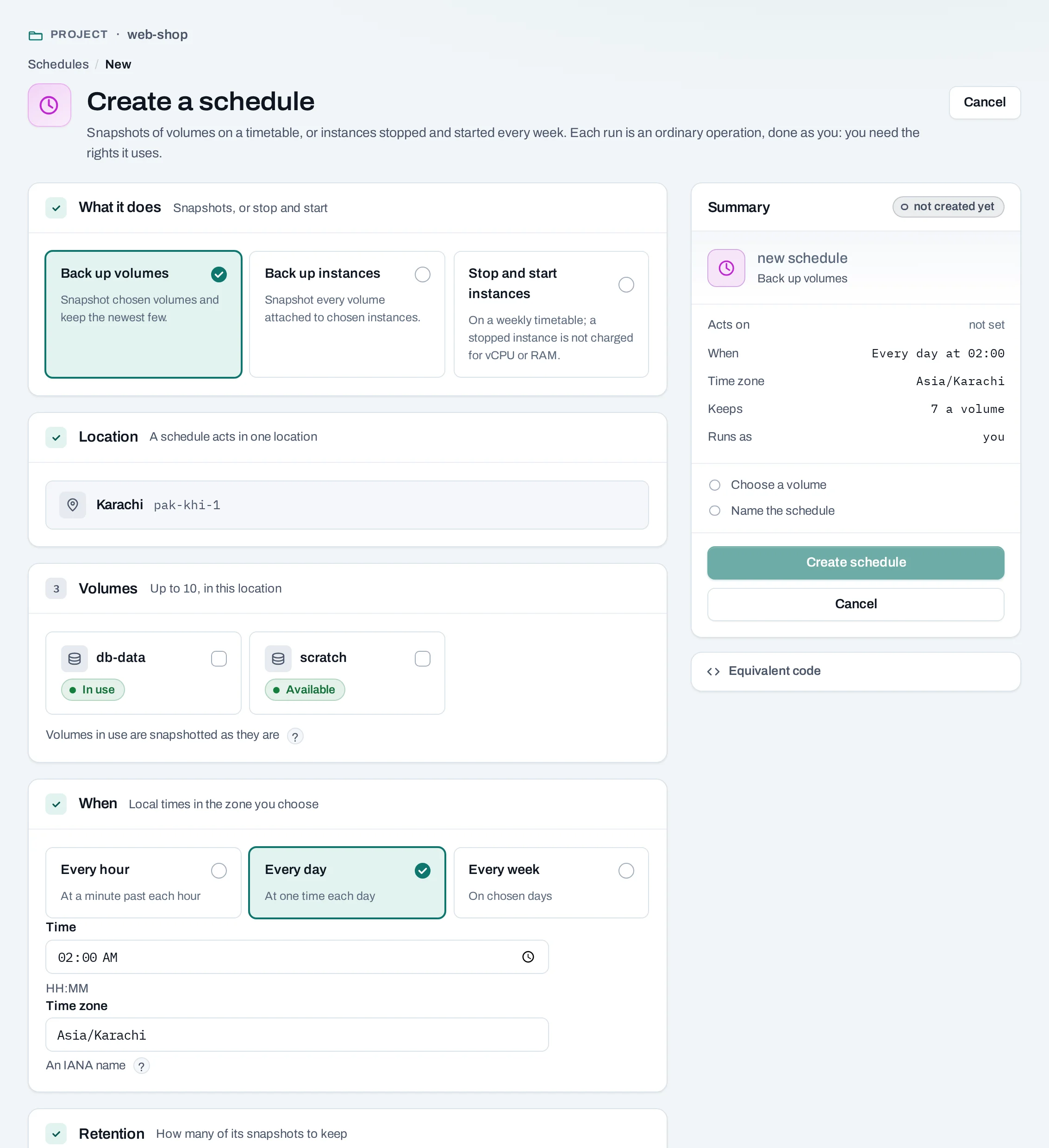
- Choose Create schedule, or Add schedule on a volume's or instance's Schedules tab.
- What it does: Back up volumes, Back up instances (every volume attached to each instance) or Stop and start instances.
- Up to 10 of the project's volumes or instances.
- When, and the time zone, such as
Asia/Karachi. - For a backup, how many snapshots to keep of each volume (1 to 100).
- Name it and choose Create schedule.
curl -sS -X POST "$NUBESTACK_API/v1/orgs/$ORG/projects/$PROJECT/schedules" \
  -H "Authorization: Bearer $NUBESTACK_API_KEY" \
  -H "Idempotency-Key: $(uuidgen)" \
  -H "Content-Type: application/json" \
  -d '{
    "kind": "backup", "name": "nightly",
    "target_type": "volume", "target_ids": ["vol_01jbdbdata"],
    "time_zone": "Asia/Karachi",
    "recurrence": {"frequency": "daily", "time": "02:00"},
    "keep": 7
  }'
A power schedule: "kind": "power", "target_type": "server" and
"power": {"days": ["mon","tue","wed","thu","fri"], "stop_at": "20:00", "start_at": "08:00"}.
A size schedule: "kind": "resize", "target_type": "instance_group" and "desired". The
answer is 201 Created.
When it runs
- Times are local to the schedule's time zone. A run starts within about a minute of its time.
- When daylight saving skips an hour, a run in it happens once, just after; when an hour repeats, it runs the first time.
- If a run was missed, only the latest missed run happens, once; there is no backlog. If the previous run is still going, the next is skipped, and the skip is shown.
- While the organization or project is suspended, nothing runs; a project's schedules pause when its deletion is requested.
Runs on a schedule lists its latest runs, with links to their operations.
Backups and how many are kept
Backup snapshots are named after the schedule and the time, for example nightly-20261029-0200.
They are ordinary snapshots: restore one to a new volume as usual.
After a run's snapshot of a volume succeeds, the schedule deletes that volume's oldest snapshots it made beyond Keeps. It never deletes a snapshot you made by hand or one another schedule made, and deletes nothing when a run failed.
A volume in use is snapshotted as it is, as if the power had been cut (crash-consistent). For a database, use its own backup tool, or stop it first. An instance's system disk that is not a volume is not snapshotted; save the instance as an image for that.
Power schedules
At a stop time each running instance is stopped; at a start time each stopped one is started. An instance already in that state is left alone. The instance's page shows its next stop and start. A stopped instance is not counted for vCPU and RAM hours, but its disks and public IPs still are.
Pause, resume, change or delete
Manage → Pause… stops it running; runs missed while paused are not made up. Resume starts it again from its next time. Edit changes it. Delete… removes it.
Changes need the schedule's version in If-Match:
curl -sS -X POST "$NUBESTACK_API/v1/orgs/$ORG/projects/$PROJECT/schedules/sch_01jbnightly:pause" \
  -H "Authorization: Bearer $NUBESTACK_API_KEY" \
  -H "Idempotency-Key: $(uuidgen)" \
  -H 'If-Match: "3"'
:resume, PATCH and DELETE work the same way and answer 200 OK.
Deleting a backup schedule keeps the snapshots it made, and they are no longer pruned. Nothing blocks deleting a schedule.
When a run fails
The person the schedule runs as gets an e-mail when a run fails, and when the schedule pauses itself because they lost the rights or everything it acts on is gone. A run of failures sends one e-mail. If they have left the organization, its owners and admins get it. Anyone who may manage the schedule can Resume it; it then runs as them.
Limits
- Up to 20 schedules per project and 10 targets per schedule.
- Nothing runs more often than once an hour.